Webhooks
Flow Access API uses webhooks to notify your system when important events occur in real time.
Instead of polling our system for updates, we push event data directly to your server whenever something happens — such as a meter sending uplinks, a recharge being completed, or water being fetched.
Webhooks are asynchronous and event-driven.
Polling vs Webhooks
Polling
- Your system repeatedly asks Flow for updates
- Increased latency and unnecessary requests
- Not suitable for real-time events
Webhooks
- Flow sends data only when something happens
- Near real-time delivery
- Lower infrastructure and network cost
How Webhooks Work
The webhook delivery flow follows these steps:
-
Register a Webhook URL When creating or configuring an API client, you provide a
webhookURL. -
An Event Occurs Examples include:
- A meter sends uplink data
- A recharge invoice is created or completed
- A water fetch is recorded
-
Flow Sends a Webhook Flow sends an HTTP
POSTrequest with a JSON payload to your webhook URL. -
Your Server Acknowledges Your server must respond with HTTP
201 Createdto confirm successful processing.
If your webhook endpoint:
- Returns any status code other than
201 Created, or - Takes longer than 10 seconds to respond
the webhook delivery is considered failed.
How to Configure Webhooks on the FLOW Platform
To start receiving webhook events, you need to configure your endpoint URLs directly within the FLOW App.
Step 1: Create a Staff Account (Recommended)
If you are working with an external development or client team, we highly recommend creating a dedicated Staff Account for them. Assign this account the necessary API permissions so the external team can configure, manage, and test webhook endpoints without needing your primary administrator credentials.
Step 2: Set Up Your Live Webhooks
- Log in to your FLOW App .
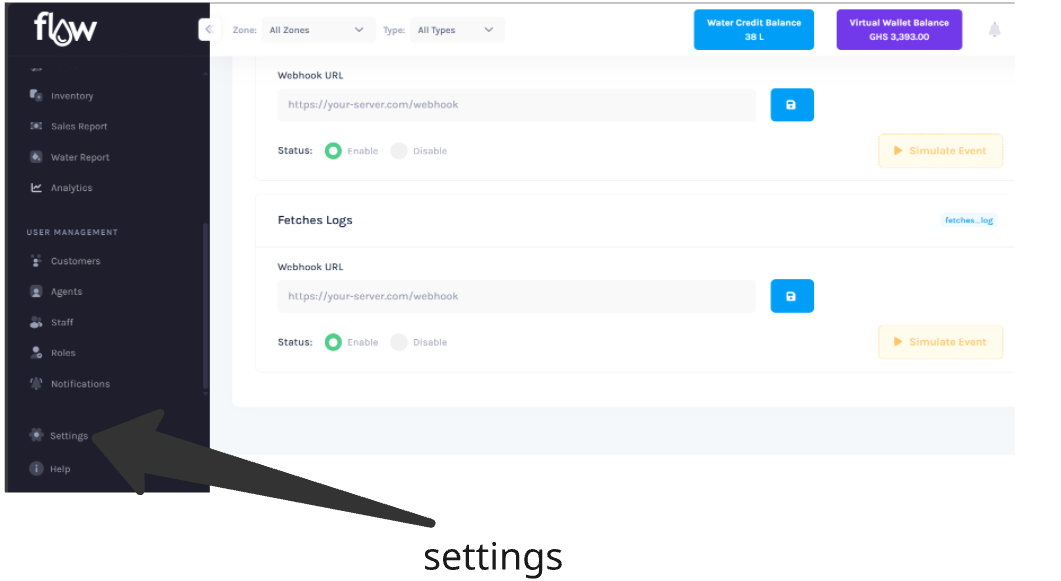
- Navigate to the API Integration tab from the settings tab.
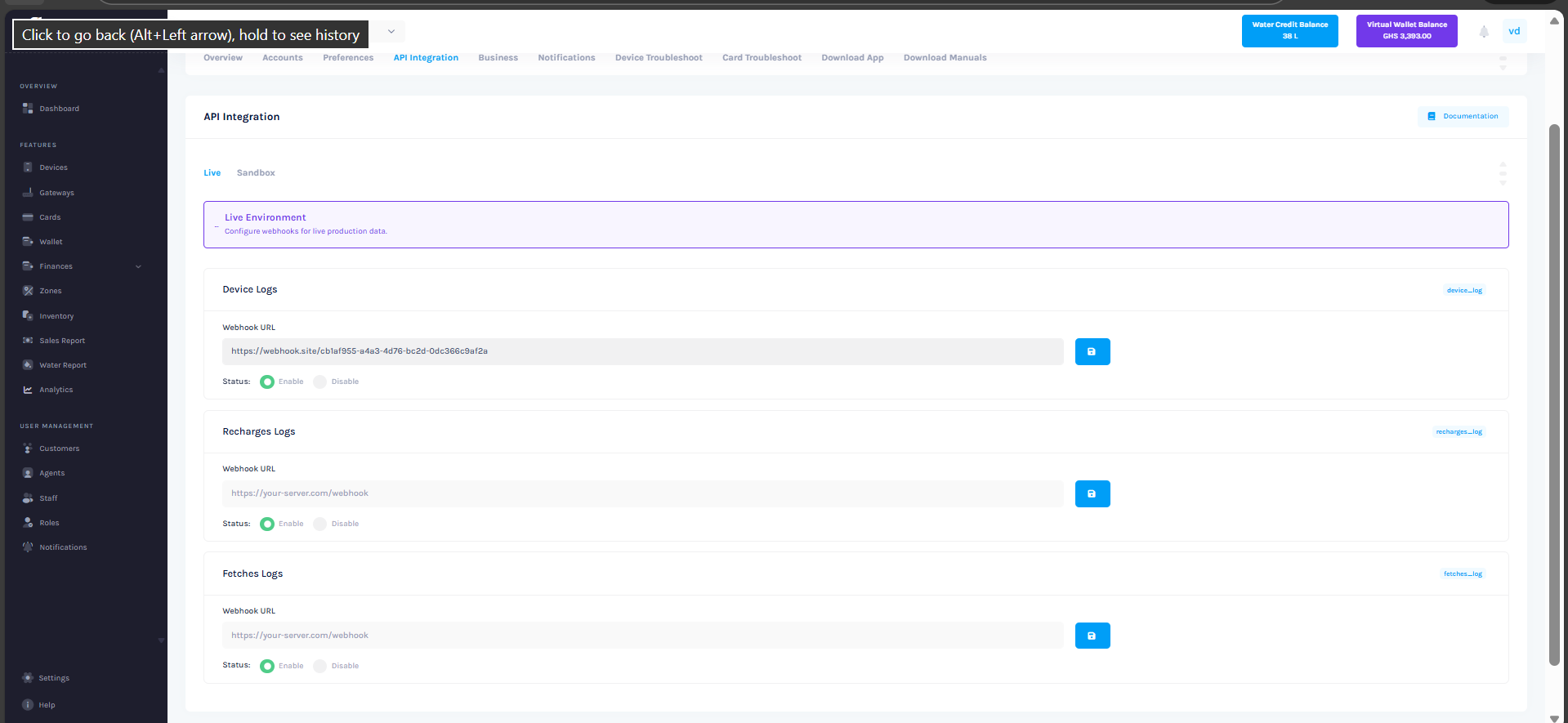
- Under the Live environment tab, locate the log type you wish to subscribe to (e.g., Device Logs, Recharges Logs, Fetches Logs).
- Enter your destination webhook URL into the input field.
- Toggle the Status switch to Enable.
- Click the Save (floppy disk) icon to store the URL.
After clicking Save, the platform will display your Client ID and Private Key. These credentials are required for authenticating with the Flow Client API. Ensure you store them securely, as the Private Key will not be shown again.
Step 3: Test Using the Sandbox Environment
Before pushing live data, you should test your data pipeline using our Sandbox to ensure your system parses the data correctly.
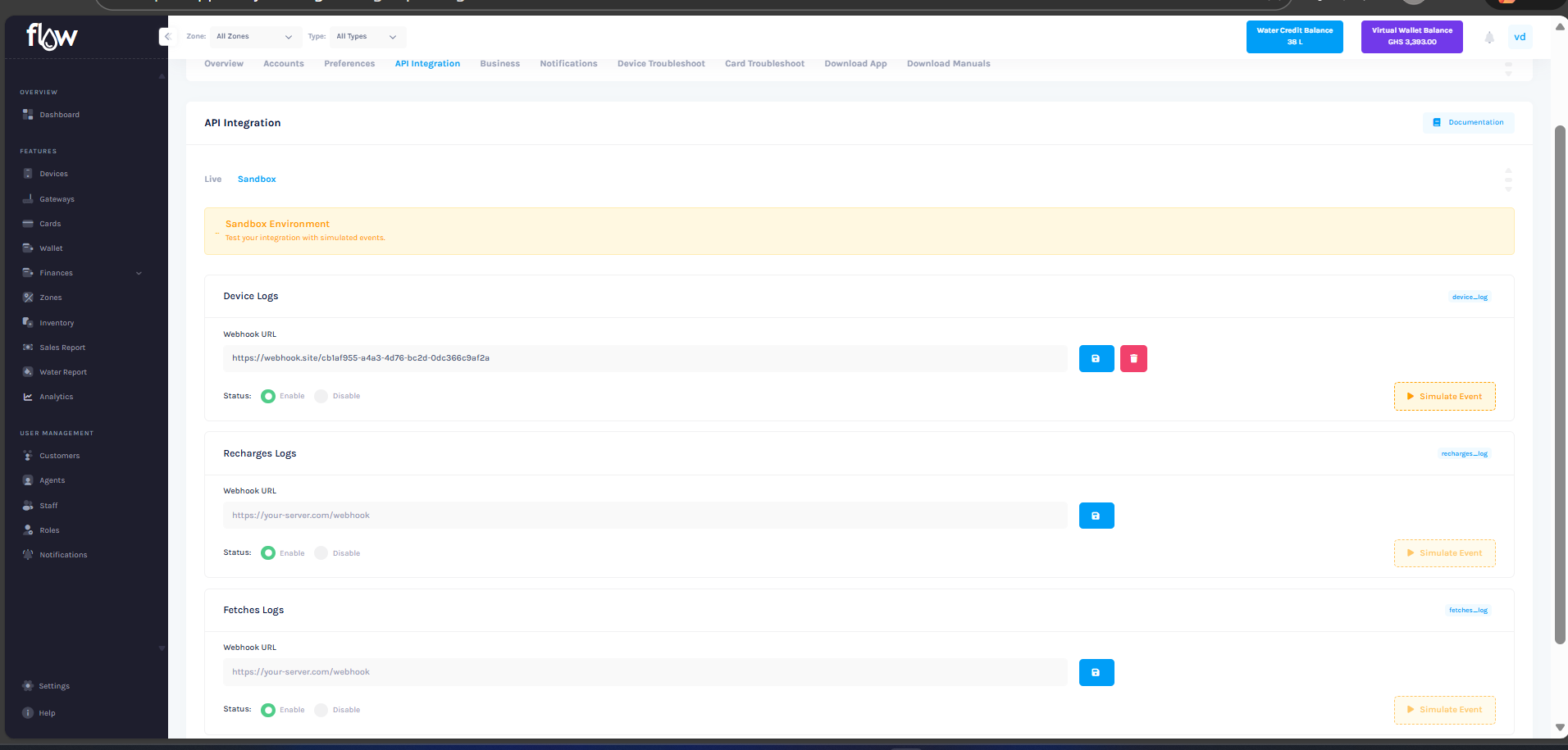
- Click on the Sandbox sub-tab within the API Integration page.
- Enter your testing webhook URL into the relevant field.
- Click the Save icon, and ensure the status is enabled.
- Click the Simulate Event button.
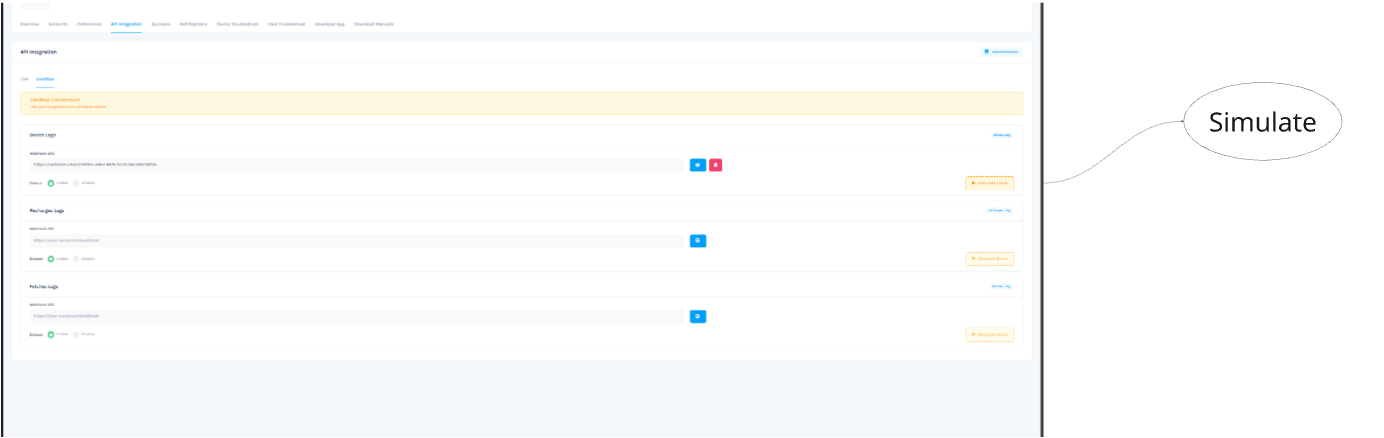
- The system will dispatch a simulated JSON payload to your endpoint. Check your server logs to verify receipt and ensure your system returns the required response.
When Webhooks Are Sent
Webhooks are sent automatically when Flow processes events from its internal event bus.
You do not need to call any API to trigger webhooks.
Internally, Flow listens to system events and forwards them to the correct client based on:
- Business ID
- Event data type
- Webhook activation status
Supported Event Types
Each webhook event has a specific purpose and payload structure.
Types of Events
Here are the webhook events currently sent by Flow. We may add more events as we hook into additional actions in the future.
| Event | Description |
|---|---|
device_log | A device (meter) has sent uplinks |
recharges_log | A recharge, invoice has been created, succeeded, or failed |
fetches_log | A water fetch transaction has been recorded |
Device Uplink (device_log)
This event is sent whenever a meter or device sends uplinks data to Flow.
Payload Structure
- JSON Payload
- Go Struct
{
    "battery1Alarm": false,
    "battery2Alarm": false,
    "eeAlarm": false,
    "emptyTubeAlarm": false,
    "flowRate": 3.107,
    "overRangeAlarm": false,
    "pipeLeakageAlarm": false,
    "pipeBurstAlarm": false,
    "receivedAt": "2026-02-24T13:16:45Z",
    "deviceTime": "2026-02-24T13:16:45Z",
    "rechargeBalance": 26.56,
    "rechargeTimes": 45,
    "reverseFlowAlarm": false,
    "address": "GH-MTR-7e91b9",
    "totalConsumption": 766.4,
    "valveStatus": 1,
    "waterTemperature": 28.4,
    "waterTemperatureAlarm": false,
    "valveMode": 1,
    "closeThreshold": 0,
    "lastPurchaseCredit": 6.8
}
type DeviceMeterUpLinkClientDomain struct {
    Battery1Alarm         bool       `json:"battery1Alarm"`
    Battery2Alarm         bool       `json:"battery2Alarm"`
    EeAlarm               bool       `json:"eeAlarm"`
    EmptyTubeAlarm        bool       `json:"emptyTubeAlarm"`
    FlowRate              float64    `json:"flowRate"`
    OverRangeAlarm        bool       `json:"overRangeAlarm"`
    PipeLeakageAlarm      bool       `json:"pipeLeakageAlarm"`
    PipeBurstAlarm        bool       `json:"pipeBurstAlarm"`
    ReceivedAt            *time.Time `json:"receivedAt"`
    DeviceTime            *time.Time `json:"deviceTime"`
    RechargeBalance       float64    `json:"rechargeBalance"`
    RechargeTimes         int64      `json:"rechargeTimes"`
    ReverseFlowAlarm      bool       `json:"reverseFlowAlarm"`
    Address               string     `json:"address"`
    TotalConsumption      float64    `json:"totalConsumption"`
    ValveStatus           float64    `json:"valveStatus"`
    WaterTemperature      float64    `json:"waterTemperature"`
    WaterTemperatureAlarm bool       `json:"waterTemperatureAlarm"`
    ValveMode             int64      `json:"valveMode"`
    CloseThreshold        int64      `json:"closeThreshold"`
    LastPurchaseCredit    float64    `json:"lastPurchaseCredit"`
}
Field Descriptions
| Field | Type | Description |
|---|---|---|
battery1Alarm | boolean | Alarm status for battery 1. |
battery2Alarm | boolean | Alarm status for battery 2. |
eeAlarm | boolean | EEPROM alarm. |
emptyTubeAlarm | boolean | Alarm for an empty tube. |
flowRate | number | Current flow rate of water. |
overRangeAlarm | boolean | Alarm for when the flow is over range. |
pipeLeakageAlarm | boolean | Alarm for a detected pipe leakage. |
pipeBurstAlarm | boolean | Alarm for a detected pipe burst. |
receivedAt | string | Timestamp (ISO 8601) when the server received the data. |
deviceTime | string | Timestamp (ISO 8601) from the device itself. |
rechargeBalance | number | The current remaining water credit balance. |
rechargeTimes | integer | The total number of times the device has been recharged. |
reverseFlowAlarm | boolean | Alarm for water flowing in the reverse direction. |
address | string | The unique serial number or identifier for the device. |
totalConsumption | number | Total water consumption recorded by the device. |
valveStatus | number | The current status of the valve. |
waterTemperature | number | The temperature of the water. |
waterTemperatureAlarm | boolean | Alarm for water temperature exceeding limits. |
valveMode | integer | The operational mode of the valve. |
closeThreshold | integer | The threshold at which the valve will close. |
lastPurchaseCredit | number | The amount of the last credit purchase. |
Recharge Receipt (recharges_log)
This feed provides information about sales transactions, specifically when a user recharges their water credit balance.
Payload Structure
- JSON Payload
- Go Struct
{
    "id": "e93f8747-ddc1-4b55-a24f-032665113dcc",
    "amount": 29.45,
    "litres": 196.32,
    "pricePerLitre": 0.15,
    "currency": "GHS",
    "paymentMode": "AirtelTigo Money",
    "paymentType": "Mobile Money",
    "status": "COMPLETED",
    "serialNumber": "GH-MTR-be5ae4",
    "deviceType": "WATER_METER",
    "volume": 196,
    "device": {
        "name": "Simulated Meter Tema",
        "serialNumber": "GH-MTR-5f39f3",
        "status": "ACTIVE",
        "category": "DOMESTIC",
        "zone": {
            "name": "Eastern Region",
            "location": "Tema",
            "currency": "GHS",
            "pricePerLitre": 0
        }
    },
    "card": {
        "serialNumber": "GH-CRD-32728e",
        "linkedAt": "2026-02-24T13:18:22Z",
        "active": true,
        "customer": null
    },
    "user": {
        "firstName": "Kwesi",
        "lastName": "Osei",
        "username": "KwesiOsei",
        "phoneNumber": "+233503019855"
    },
    "performedBy": {
        "firstName": "Afua",
        "lastName": "Asare",
        "username": "AfuaAsare",
        "phoneNumber": "+233401276567"
    },
    "completedAt": "2026-02-24T13:18:22Z",
    "createdAt": "2026-02-24T13:18:22Z",
    "zone": {
        "name": "Eastern Region",
        "location": "Tema",
        "currency": "GHS",
        "pricePerLitre": 0.15
    },
    "type": "credit.topup"
}
type RechargeClientDomain struct {
    ID            string              `json:"id"`
    Amount        float64             `json:"amount"`
    Litres        float64             `json:"litres"`
    PricePerLitre float64             `json:"pricePerLitre"`
    Currency      string              `json:"currency"`
    PaymentMode   string              `json:"paymentMode"`
    PaymentType   string              `json:"paymentType"`
    Status        string              `json:"status"`
    Reason        string              `json:"reason,omitempty"`
    SerialNumber  string              `json:"serialNumber,omitempty"`
    DeviceType    string              `json:"deviceType"`
    Volume        int                 `json:"volume"`
    Device        *DeviceClientDomain `json:"device"`
    Card          *CardClientDomain   `json:"card"`
    User          *UserClientDomain   `json:"user,omitempty"`
    PerformedBy   *UserClientDomain   `json:"performedBy"`
    CompletedAt   *time.Time          `json:"completedAt"`
    CreatedAt     *time.Time          `json:"createdAt"`
    Zone          *ZoneClientDomain   `json:"zone,omitempty"`
    Type          string              `json:"type"`
}
Field Descriptions
| Field | Type | Description |
|---|---|---|
id | string | The unique ID for this recharge transaction. |
amount | number | The monetary amount of the recharge. |
litres | number | The number of litres of water credited. |
pricePerLitre | number | The price per litre at the time of the transaction. |
currency | string | The currency of the transaction. |
paymentMode | string | How the payment was made (e.g., "MOBILE_MONEY", "CARD"). |
paymentType | string | The type of payment (e.g., "PREPAID"). |
status | string | The status of the transaction (e.g., "COMPLETED"). |
device | object | Details about the device. |
card | object | Details about the card used. |
user | object | The user who checks the account. |
performedBy | object | The user who performed the recharge. |
completedAt | string | Timestamp (ISO 8601) when the transaction was completed. |
createdAt | string | Timestamp (ISO 8601) when the transaction was created. |
zone | object | Details about the zone. |
type | string | The type of transaction. |
Water Fetch Receipt (fetches_log)
This feed provides a receipt every time water is fetched from a device.
Payload Structure
- JSON Payload
- Go Struct
{
    "id": "0eaef0da-7747-47d2-94d8-7c8936286798",
    "type": "fetch",
    "user": {
        "firstName": "Ama",
        "lastName": "Mensah",
        "username": "AmaMensah",
        "phoneNumber": "+233315634867"
    },
    "serialNumber": "GH-MTR-4df53a",
    "litres": 56.26,
    "pricePerLiter": 0.15,
    "amount": 8.44,
    "createdAt": "2026-02-24T13:19:28Z",
    "zone": {
        "name": "Northern Region",
        "location": "Obuasi",
        "currency": "GHS",
        "pricePerLitre": 0.15
    },
    "device": {
        "name": "Simulated Meter Obuasi",
        "serialNumber": "GH-MTR-54a4d8",
        "status": "ACTIVE",
        "category": "DOMESTIC",
        "zone": {
            "name": "Northern Region",
            "location": "Obuasi",
            "currency": "GHS",
            "pricePerLitre": 0
        }
    },
    "card": {
        "serialNumber": "GH-CRD-915ccc",
        "linkedAt": "2026-02-24T13:19:28Z",
        "active": true,
        "customer": null
    },
    "balance": 21.36,
    "businessId": "bbae9a2a-90e1-4da2-b012-cb6a46011b92"
}
type WaterReceiptClientDomain struct {
    ID   string            `json:"id"`
    Type string            `json:"type"`
    User *UserClientDomain `json:"user"`
    SerialNumber string  `json:"serialNumber"`
    Litres       float64 `json:"litres"`
    LitrePrice float64 `json:"pricePerLiter"`
    Amount     float64 `json:"amount"`
    CreatedAt  *time.Time          `json:"createdAt"`
    Zone       *ZoneClientDomain   `json:"zone"`
    Device     *DeviceClientDomain `json:"device"`
    Card       *CardClientDomain   `json:"card"`
    Balance    float64             `json:"balance"`
    BusinessId string              `json:"businessId"`
}
Field Descriptions
| Field | Type | Description |
|---|---|---|
id | string | The unique ID for this water fetch receipt. |
type | string | The type of event (e.g., "FETCH"). |
user | object | The user who fetched the water. |
serialNumber | string | The serial number of the device. |
litres | number | The amount of water fetched in litres. |
pricePerLiter | number | The price per litre at the time of fetching. |
amount | number | The total cost of the water fetched. |
createdAt | string | Timestamp (ISO 8601) when the water was fetched. |
zone | object | The zone where the fetch occurred. |
device | object | The device used for fetching. |
card | object | The card used for fetching. |
balance | number | The remaining balance on the account. |
businessId | string | The ID of the business associated with this transaction. |
Handling Webhooks Correctly
Your webhook endpoint should:
- Accept
POSTrequests - Parse JSON payloads
- Process the event idempotently
- Respond within 10 seconds
Example Integration
- Go
func HandleWebhook(c echo.Context) error {
    // ... (see api.md for full struct definitions)
    return c.NoContent(http.StatusCreated)
}